
How to Become Your Favorite Superhero with AI (Kling Motion Control)
Ever wanted to see yourself as Spider-Man climbing a skyscraper, or Iron Man saving the day?
Here's exactly how to turn yourself into any superhero using AI motion control (and it's easier than you think).
This technique combines your real movements with AI image generation and motion control to create videos where you ARE the superhero. No green screen required.
What You'll Need
- Your phone camera (or any camera)
- Higgsfield. to access Nano Banana Pro (for image generation) and Kling Motion Control (for the video)
- ChatGPT (for prompt writing)
The Process
Step 1: Film Your Superhero Scene
Act out your superhero moment. Punch the air. Strike a power pose. Dodge imaginary attacks. Whatever scene you want—just perform it.
The key here: commit to the movement. The more authentic your acting, the better your final result.
Step 2: Grab a Clean Screenshot
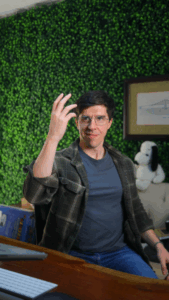
Pause your video and take a screenshot from a frame where you're perfectly clear—no motion blur, no weird mid-blink expressions. This screenshot becomes the foundation for everything else.
Sharp and clear = better AI results.
Step 3: Transform Yourself with Nano Banana Pro
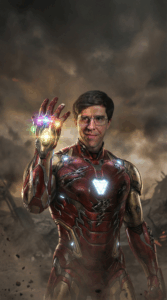
This is where you become the superhero. But here's the trick most people miss:
Go to ChatGPT first.
Upload your screenshot and say: "Write me a Nano Banana Pro prompt to turn me into [your superhero] in the exact same pose I'm in right now."
ChatGPT will analyze your pose and write a prompt that maintains your body position while transforming you into the character. This pose matching is absolutely critical for the motion control to work smoothly.
Run that prompt through Nano Banana Pro (along with the screenshot you took). Now you've got an AI image of yourself as your superhero—in the exact same pose as your original video.
Step 4: Bring It to Life with Kling Motion Control
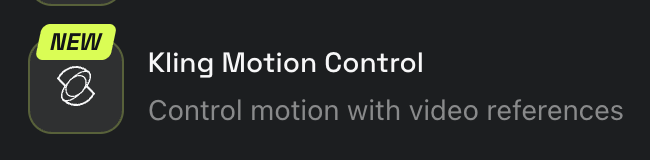
Head to Higgsfield.ai and select Kling Motion Control.
Upload your original video then upload your AI-generated image.
Step 5: Write Your Scene Prompt
Write a short prompt describing what's happening in your scene. But here's what works and what doesn't:
DO prompt for:
- Wind effects
- Sunlight streaming through
- Background people moving
- Clouds drifting
- Environmental details
DON'T prompt for:
- Camera movements (zoom, pan, tilt)
- Anything related to camera motion
Keep it simple. "Superman landing with force, debris and dust kicking up" works better than a paragraph.
Hit Generate. Wait for the magic.
Why This Works
Kling Motion Control maps the movement from your original video onto your AI-generated superhero image. Because ChatGPT helped you match the pose exactly, the motion transfer is clean—your movements become your superhero's movements.
The result? A video of you as your favorite character, performing the exact actions you filmed.
Pro Tips
- Lighting matters: Film in good light so your screenshot is crisp
- Solid backgrounds: Simpler backgrounds generally give cleaner results
- Commit to the performance: Dramatic movements translate better than subtle ones
- Test different superheroes: The same video can be transformed into multiple characters
- Save your ChatGPT prompts: If you find one that works well, reuse it for similar poses
The Bottom Line
This isn't about perfect Hollywood VFX. It's about creating genuinely cool content where YOU are the superhero. The process takes maybe 7 minutes once you've filmed your scene.
Film it. Transform it. Animate it. That's the whole workflow.
Now go become the superhero you've always wanted to be!